To choose between Logitech MX Keys S and MX Keys Mini, start with how often you enter numbers and how much room your mouse needs. A small desk does not automatically rule out a number pad, and opening a spreadsheet does not mean you need one every day.
This documentary comparison covers the standalone multi-OS keyboards sold in the United States. It excludes the original MX Keys, MX Mechanical, Mac-only editions, Business packs, and mouse bundles. We have not physically tested typing, noise, battery life, or comfort.
Decision table: what changes on your desk
The US MX Keys S page and MX Keys Mini page present full-size and compact formats. Logitech’s specification and setup documents support the dimensions and connections below.
| Criterion | MX Keys S | MX Keys Mini | What it means for you |
|---|---|---|---|
| Dedicated number pad | Yes | No | The S keeps number entry in a separate block |
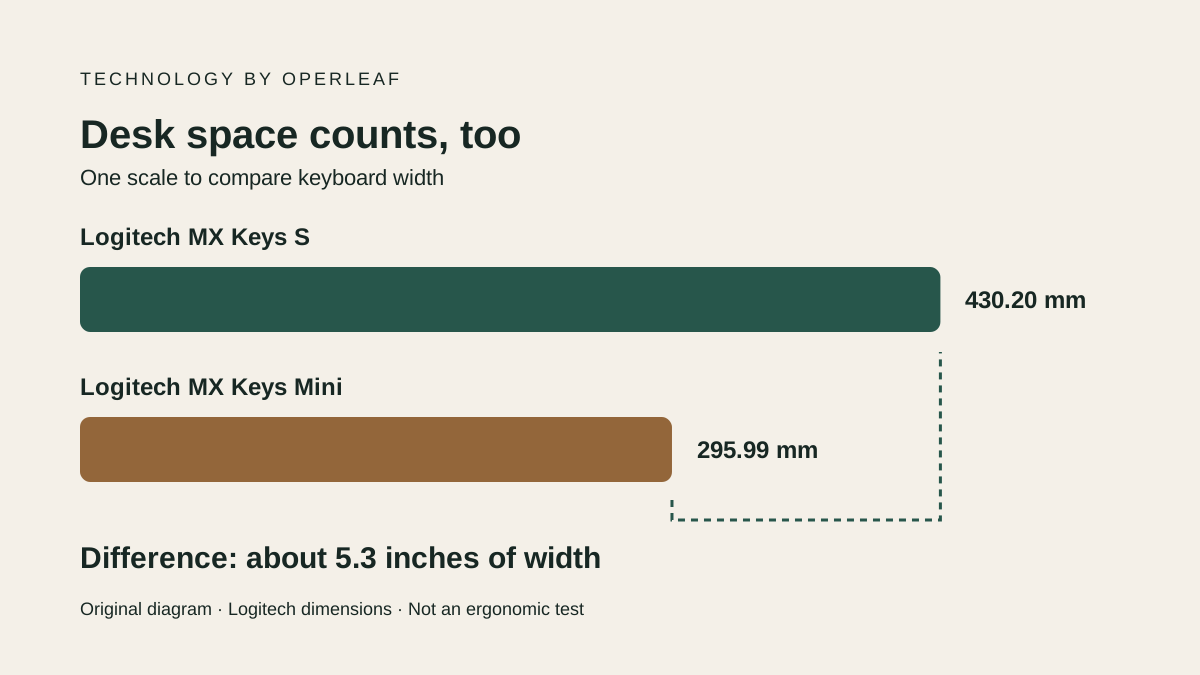
| Published width | 430.20 mm, about 16.94 in | 295.99 mm, about 11.65 in | The Mini occupies 134.21 mm less width |
| Wireless connection | Bluetooth Low Energy or Logi Bolt | Bluetooth Low Energy; Logi Bolt compatible | Check the connection supported by your computer |
| Receiver | S setup guide includes Logi Bolt | Check the specific package contents | Bolt compatibility does not establish receiver inclusion |
| Device switching | Up to three with Easy-Switch | Up to three with Easy-Switch | Both can switch between paired devices |
| Keys | Backlit scissor mechanism | Backlit scissor mechanism | The Mini is not the S’s mechanical alternative |
| USB-C | Charging; typing can continue while charging | Charging; typing can continue while charging | A charging cable does not establish wired data input |
Check the S specifications and Mini specifications for system requirements. These are documented hardware differences, not evidence that either keyboard makes you type faster.
Calculate the space the Mini gives back
The width difference is 430.20 − 295.99 = 134.21 mm, or about 5.3 inches using 25.4 mm per inch. This calculation uses manufacturer dimensions; it is not our desk measurement or a guarantee of extra mouse travel.
Illustrative setup: reserve a 600 mm-wide area, about 23.6 inches, for keyboard and mouse. With no other objects, subtracting keyboard width leaves 169.80 mm for the S and 304.01 mm for the Mini. The mouse itself and your movements still have to fit in that remainder.
Mark both widths on your desk with tape. Center the letter keys in front of your seat and put the mouse where you actually use it. The extra space may help you bring it closer or clear the surface. That does not establish relief from wrist discomfort or replace an assessment of your posture.
The S makes more sense when you regularly use a number pad for amounts, quantities, or codes. If most work is writing and browsing with occasional numbers, check whether the Mini’s top row is sufficient. Adding a separate number pad later changes both the cost and the space you expected to save.
Check Bluetooth, receiver, and software separately
The S setup guide documents its included Bolt receiver and Bluetooth option. The Mini setup guide explains Bluetooth pairing and Easy-Switch. Verify the contents of the actual retail SKU and whether its connection requires a port or adapter.
Both guides describe USB-C charging with continued typing during charging. Their documented connection modes are wireless. Do not buy either to meet a requirement for a keyboard sending input over a USB cable.
Separate manual channel switching from software features, too. Current product pages describe Logi Options+ customization and Smart Actions for both models; the larger S does not have exclusive access to that capability. Check your operating system and whether you may install the software. On an employer-managed computer, installation permission may determine which features you can use.
For a laptop-based desk, account for ports and peripherals before replacing the computer as well. The MacBook Air M5 versus Pro M5 comparison addresses that separate decision.
US buying checklist: compare the complete package
Logitech’s US pages show product selections and offers that can change. We are not fixing a current price because we have not validated a cart for a specific keyboard configuration. Compare standalone keyboards with the US layout and equivalent accessories, in USD, adding applicable sales tax and shipping at checkout.
Before paying, check these five points for the SKU you will receive:
- Full model name: multi-OS MX Keys S or MX Keys Mini, without confusing it with Mechanical, Business, or a Mac-only version.
- Physical layout: US legends, Enter shape, and symbols you use. An English product page does not establish the seller’s keyboard layout.
- Connection: your computer’s Bluetooth support, or a Bolt receiver and any adapter required by that package.
- Contents: receiver, cable, and palm rest if wanted. A bundle and a standalone keyboard are different purchases.
- Delivered cost and returns: accessories, shipping, tax, and the seller’s terms for that specific item.
Try your tasks before replacing a working keyboard
The keyboard task CSV prepares five checks: paragraph and symbols, amounts and codes, device switching, space and package contents. Record device, operating system, physical layout and connection before the observed result. All results begin unchecked.
Use the same task on both options when you can try them. Separate a symbol you cannot find because of the layout from a connection failure or a feature requiring software. Preserve exact text for codes such as REF-00124; when importing numeric-only codes into a spreadsheet, set that column to text so leading zeros remain. Record the problem a change would solve and anything still unresolved. This is a proposed trial log, without our own accuracy, speed or ergonomic measurements.
For a tablet, also check screen support and the connection available on its operating system. A standalone keyboard does not provide a tablet cover or stand. If you are still choosing screen size, the Galaxy Tab S12+ versus Ultra comparison covers space and portability.
Buy the S when the number pad earns its width. Buy the Mini when the freed surface solves a real problem and you can work without that pad. Keep your current keyboard when it already meets the tasks and connections: size and a generation label alone do not establish a useful upgrade.