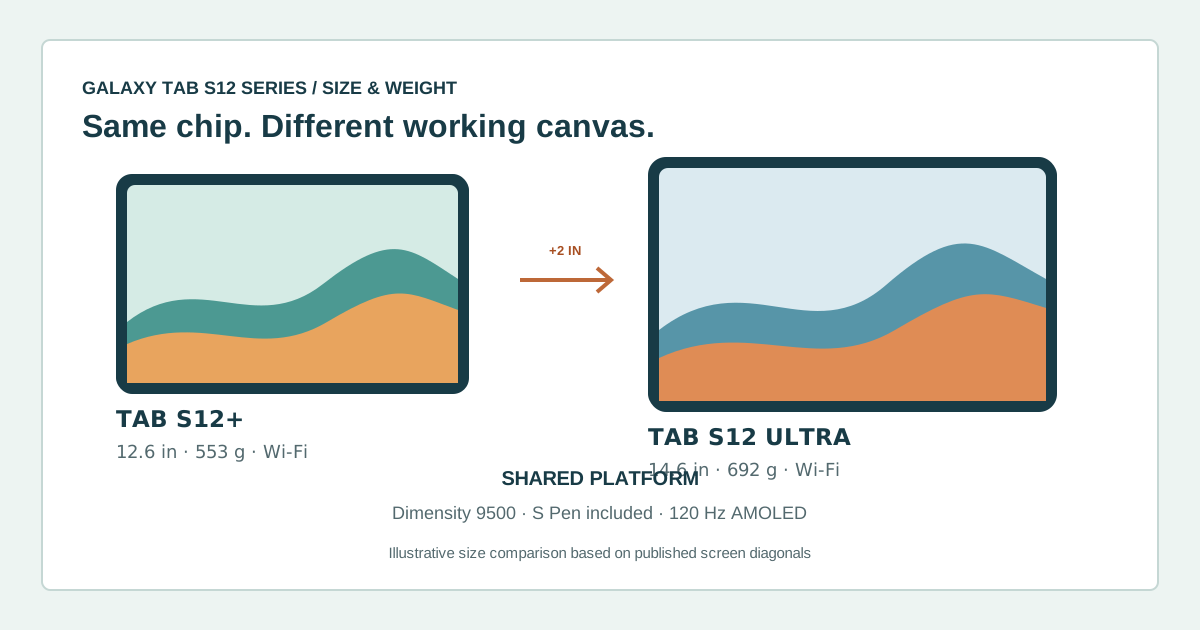
The Galaxy Tab S12+ and S12 Ultra share the Dimensity 9500 processor, 120 Hz AMOLED screens, an included S Pen, and IP68 ratings. The buying decision is mainly about the screen and what you carry: the Plus is 12.6 inches and 553 g for Wi-Fi, while the Ultra is 14.6 inches and 692 g. This is a specification-based comparison, not a hands-on review or an independent performance test.
Samsung announced both tablets on September 30, 2026, with availability beginning October 7 in select markets. On October 14, its U.S. store listed 256 GB Wi-Fi configurations from $1,199.99 for the S12+ and $1,399.99 for the Ultra. Prices and offers can change; the U.S. checkout price excludes sales tax.
The practical differences
| Feature | Galaxy Tab S12+ | Galaxy Tab S12 Ultra | What it changes |
|---|---|---|---|
| Display | 12.6 in, 2,800 × 1,752, Dynamic AMOLED 2X, up to 120 Hz | 14.6 in, 2,960 × 1,848, Dynamic AMOLED 2X, up to 120 Hz | The Ultra gives split-screen work and large canvases more room; its resolution is also higher. |
| Wi-Fi weight | 553 g | 692 g | The Ultra adds 139 g before a case or keyboard. Samsung lists 555 g and 695 g for 5G versions. |
| Thickness | 5.3 mm | 5.1 mm | The larger tablet is slightly thinner, but it is still the heavier device to hold. |
| Processor | MediaTek Dimensity 9500 | MediaTek Dimensity 9500 | Do not pay for the Ultra expecting a faster chip; Samsung specifies the same processor. |
| Battery | 10,600 mAh; up to 21 hours of video playback | 11,600 mAh; up to 23 hours of video playback | The Ultra has more capacity and a higher manufacturer playback claim; actual battery life varies. |
| Wireless | Wi-Fi 6E; Bluetooth 6.0 | Wi-Fi 7; Bluetooth 6.0 | Wi-Fi 7 matters only with a compatible network and a workload that benefits from it. |
| Storage and memory | 12 GB memory; 256 or 512 GB storage | 12 GB/256 GB, 12 GB/512 GB, or 16 GB/1 TB | Choose the Ultra if you need the listed 1 TB configuration; both support microSD up to 2 TB. |
| Included pen and rating | S Pen; IP68 | S Pen; IP68 | The basic pen-in-box and water/dust-resistance proposition is shared. |
The S12 Ultra’s panel is about 16% larger by diagonal, but diagonal alone does not describe usable workspace. The ratio of resolution and the layout of your apps matter too. Samsung’s published figures show a 14.6-inch 2,960 × 1,848 display against the Plus’s 12.6-inch 2,800 × 1,752 display. Both are 120 Hz Dynamic AMOLED 2X panels, so the premium is not a different display technology or refresh rate.
The Ultra is not a faster-processor upgrade: Samsung lists Dimensity 9500 for both models. It does offer a larger battery, Wi-Fi 7, and a 1 TB option; those are specific reasons to choose it, not proof that every task will run better. Samsung’s video-playback duration is a lab claim, not a guarantee for gaming, meetings, brightness settings, or mixed use.
Which one fits your use?
| Your use | Better starting point | Why |
|---|---|---|
| Reading, notes, video calls, and carrying the tablet daily | S12+ | It keeps the shared processor and S Pen while weighing 139 g less in the Wi-Fi version. |
| Split-screen reference work, large diagrams, or a tablet used mostly on a desk | S12 Ultra | The 14.6-inch panel provides more room for two or three panes. Measure your bag and stand before buying. |
| Drawing or handwritten notes | Try the S12+ first | Both include an S Pen; choose the Ultra only if the larger canvas changes your workflow. |
| Local files exceed 512 GB or your router supports Wi-Fi 7 | S12 Ultra | It is the only model with a listed 1 TB option and the only one in this pair with Wi-Fi 7. |
| You want a tablet to replace a laptop | Check your apps and accessories first | The keyboard is separate, and a large screen does not ensure desktop-app compatibility. |
Try the footprint before paying for the Ultra
Samsung’s dimensions table lets you plan a carrying check before buying. These are the outer dimensions in landscape, without a case or keyboard:
| Wi-Fi model | Outer rectangle | Weight without accessories |
|---|---|---|
| S12+ | 289.5 × 187.8 mm | 553 g |
| S12 Ultra | 326.3 × 208.5 mm | 692 g |
Our outer-rectangle calculation—width × height—gives the Ultra approximately 25.1% more footprint. This is physical footprint rather than active display area, and does not imply 25.1% more productivity. The weight difference is 139 g before accessories.
- Draw or cut out both rectangles using cardstock. Check the usable compartment and bag opening; a laptop’s advertised screen-size fit does not establish that the tablet and case will fit.
- Put the rectangle on your desk or stand and allow room for a keyboard, hands, and documents. Cardstock cannot establish weight, glare, comfort, or actual stand stability.
- If you can try a unit, open the same PDF and your notes at your usual text size. Record whether you can read and write without constantly switching windows. This is a proposed buyer test, not a measurement we performed.
Hypothetical example: a rectangular compartment and opening measuring 310 × 220 mm would accept the bare Plus rectangle but not the Ultra’s long edge. That rules out the Ultra for this compartment before comparing features; for a real purchase, allow clearance and check thickness and the case too. If both fit, decide whether the extra space solves a task you have actually checked.
U.S. price check
On October 14, Samsung’s U.S. pages showed the 256 GB Wi-Fi S12+ at $1,199.99 and the Ultra starting at $1,399.99 for 256 GB. The displayed starting-price difference is $200 before sales tax. Higher storage changes the Ultra price: Samsung showed $1,599.99 for its 512 GB configuration. Compare like-for-like storage and connectivity at checkout; trade-in credits and promotions are not a stable discount. These are U.S. store prices, not a reference for another market.
Bottom line
For most people choosing between these two new tablets, start with the S12+. It keeps the same processor, pen, screen technology, and refresh rate in a noticeably lighter body. The S12 Ultra is the deliberate large-screen option: pay extra when the 14.6-inch workspace, Wi-Fi 7, larger battery, or 1 TB configuration is useful enough to justify the extra size and cost. See our editorial method for how we handle manufacturer specifications and price snapshots.