For a storage upgrade, first confirm that your PC supports the drive and you need its 2TB capacity. Then compare the complete cost. Do not choose on the PRO name or a PCIe 5.0 label alone: lane count and workload matter.
This documentary comparison covers the 2TB 990 EVO Plus and bare 990 PRO without a heatsink. It is not about the non-Plus 990 EVO or the 1TB and 4TB versions. We have not measured load times, temperatures, or sustained writes.
Compare the 2TB versions, not the family headline
The table follows the 2TB rows in the official 990 EVO Plus and 990 PRO datasheets. All performance maxima are manufacturer claims under their test conditions.
| Feature | 990 EVO Plus 2TB | 990 PRO 2TB | Practical consequence |
|---|---|---|---|
| Form factor | M.2 2280 | M.2 2280 | Check mounting and clearance in the PC |
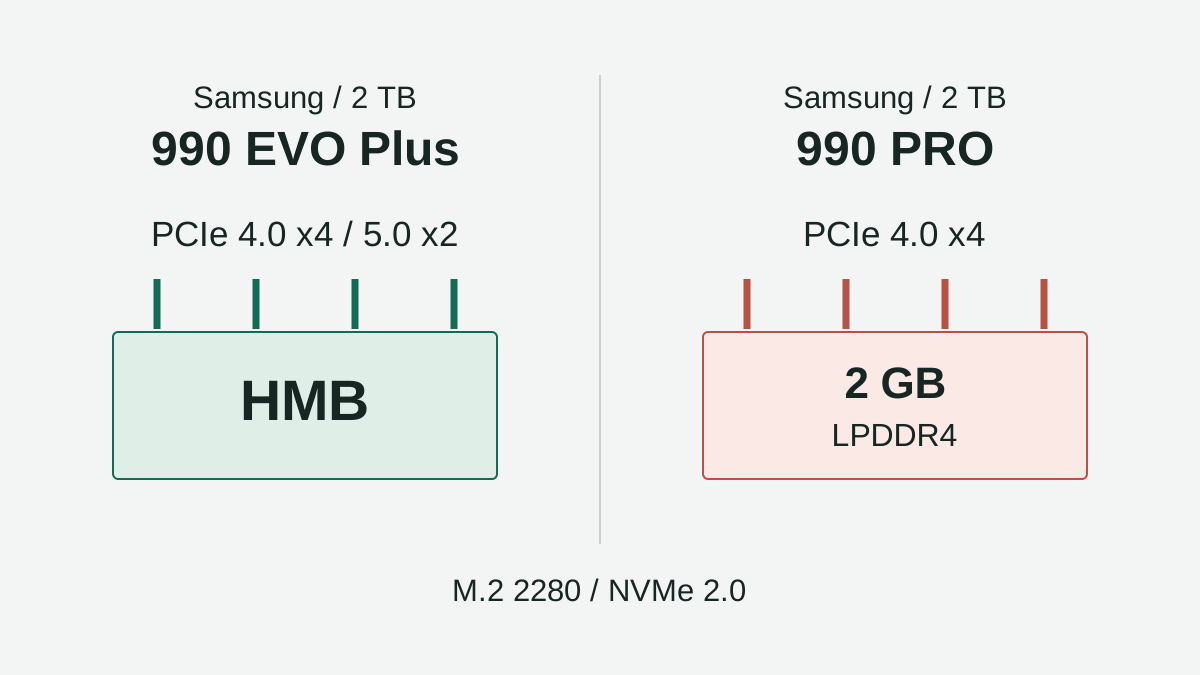
| Interface | PCIe 4.0 x4 / 5.0 x2 | PCIe 4.0 x4 | 5.0 x2 is not a four-lane Gen 5 drive |
| Protocol | NVMe 2.0 | NVMe 2.0 | A SATA-only slot is not sufficient |
| Flash | Samsung V-NAND TLC | Samsung V-NAND TLC | The PRO name does not change this NAND category |
| Management memory | Host Memory Buffer | Dedicated 2GB LPDDR4 | Different architectures, not a daily-speed measurement |
| Maximum sequential read | Up to 7,250MB/s | Up to 7,450MB/s | Does not predict a game’s opening time |
| Maximum sequential write | Up to 6,300MB/s | Up to 6,900MB/s | Not sustained speed for every file transfer |
| Random read, QD32 | Up to 1,000,000 IOPS | Up to 1,400,000 IOPS | That queue depth does not describe every home-PC task |
| Random write, QD32 | Up to 1,350,000 IOPS | Up to 1,550,000 IOPS | We do not translate IOPS into application improvement percentages |
| Warranty write limit | 1,200TBW | 1,200TBW | PRO does not add a higher TBW limit at this capacity |
| Limited warranty period | Five years or TBW, whichever comes first | Five years or TBW, whichever comes first | Not a forecast of when the drive will fail |
| Bare-drive dimensions | Max. 80.15 × 22.15 × 2.38mm | 80 × 22 × 2.3mm | Check any added cooling hardware too |
Source discrepancy: the U.S. EVO Plus product page shows 7,150MB/s in its detailed table while its headline and the 2TB datasheet row say 7,250MB/s. We use the capacity-specific datasheet, not an independent result or a silently averaged number.
What dedicated DRAM does, and what it does not prove
HMB means Host Memory Buffer: EVO Plus uses host memory for that management function. PRO carries its own DRAM. This difference should not be confused with TurboWrite’s write cache or treated as a guarantee of shorter waits in every task.
To choose PRO for a demanding workload, look for an independent test of that task, capacity, and setup. We do not supply one here. The published maxima and differing manufacturer test systems are not a shared benchmark establishing a real editing or gaming advantage.
Five checks before ordering
- Slot: consult the laptop or motherboard manual. It needs NVMe M.2 2280 support; an M.2 connector alone does not establish compatibility with both drives.
- Lanes: check generation, lane count, and whether the slot shares resources with other connectors. Datasheet notes cover PCIe 3.0 backward compatibility, not full advertised speed on that interface.
- Cooling: check clearance and the cooling solution allowed by the PC. Do not buy a heatsink variant that prevents the cover from closing.
- Migration: decide whether to add a second drive or replace the boot drive. Prepare a recoverable backup and the required media before opening the computer.
- Setup: verify detection, firmware, and operation on a supported system. Do not erase the old copy until your files and applications are checked.
This is an editorial purchase checklist, not a certification of your PC. If you need a drive that connects over USB and moves between computers, see T7 Shield vs. T9 instead of treating these internal SSDs as portable storage.
Complete a computer compatibility record
The SSD check CSV separates five decisions: format and protocol, slot, clearance, recovery and final checks. Record the exact computer model and manual page before marking a condition verified. Rows start unchecked and certify no computer.
A manual supporting only M.2 SATA does not meet these drives’ NVMe requirement. A compatible older-generation slot may solve capacity without delivering the table’s maxima. These are separate questions: first compatibility, then evidence of an advantage for your workload. If the manual is missing or a heatsink variant will not fit, keep that decision pending before buying.
Example: more space is not a peak-speed contest
Illustrative scenario: a PC stores a photo library and its current SSD is running out of room. With a compatible second slot, the owner can compare adding 2TB against migrating everything. EVO Plus can make sense if it costs less and no defined requirement justifies PRO.
If the problem is a long transfer slowing down, this table cannot name a winner: sustained tests and information about the rest of the system are missing. If the current drive has space and meets your needs, replacing it solely for a difference in advertised maxima is a weak reason.
U.S. cost and the short answer
The U.S. pages identify EVO Plus 2TB and PRO 2TB, but we have not verified two comparable, immediately purchasable checkouts. We do not claim an Amazon discount or inventory.
Compare U.S. dollars, seller terms, shipping, sales tax, cooling, and installation costs. Confirm 2TB capacity and whether a heatsink is included; search results can mix variants. Check the limited warranty’s conditions rather than treating TBW as a guaranteed lifespan.
EVO Plus fits when compatible and its complete cost is lower for your needs. PRO warrants considering dedicated DRAM and evidence for your workload, not a promise of more FPS. Keep your current drive if it still meets the job. Datasheets checked November 9, 2026; other sources retain their dates. No hands-on testing.